Incident Console
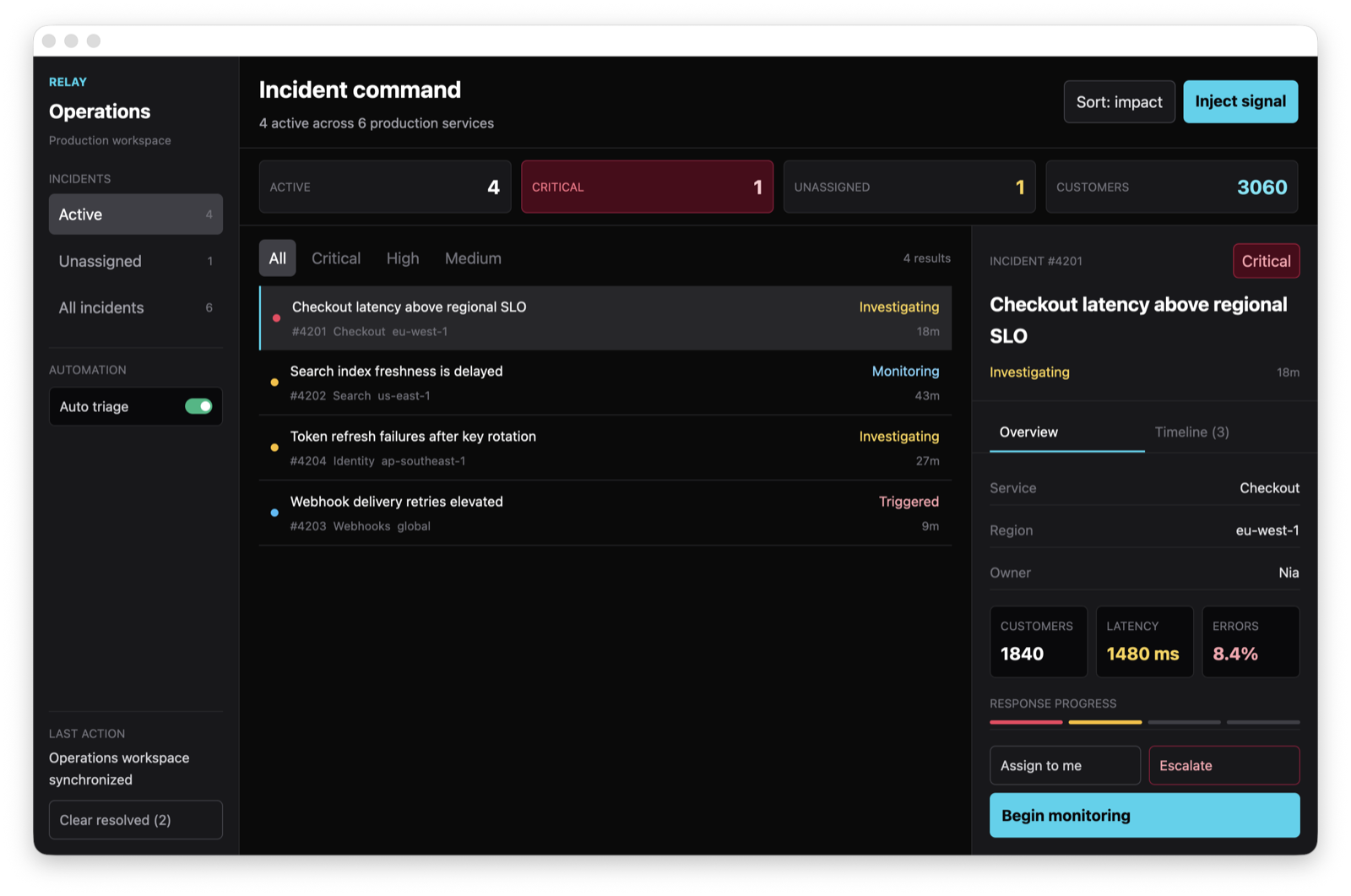
The Incident Console is the repository’s complete application example. It models an operations workflow instead of presenting isolated syntax samples: incidents can be filtered, selected, assigned, escalated, advanced through a response lifecycle, and inspected through an event timeline.
Run It
Section titled “Run It”The demo uses the repository’s pinned GPUI revision and Rust toolchain:
cargo run --manifest-path demo/Cargo.toml --bin incident_console --lockedThe initial window is 1320 x 820 and contains a stable navigation rail, an incident queue, and a detail inspector.
Interaction Model
Section titled “Interaction Model”| Area | Behavior |
|---|---|
| Scope | Switch between active, unassigned, and historical incidents. |
| Severity | Filter the current queue by critical, high, or medium severity. |
| Sorting | Toggle between customer impact and newest signal. |
| Automation | Enable or pause automatic ownership and investigation for simulated signals. |
| Lifecycle | Move an incident through Triggered, Investigating, Monitoring, and Resolved. |
| Timeline | Review alert, action, recovery, and note events for the selected incident. |
| Simulation | Inject deterministic production signals without external services. |
Source Layout
Section titled “Source Layout”The binary uses Cargo’s directory-style target so the entry point stays small:
demo/src/bin/incident_console/├── main.rs window startup only├── domain.rs incident types and lifecycle rules├── model.rs derived state and application transitions├── sample_data.rs initial incidents and deterministic signals├── view.rs top-level composition and metrics├── sidebar.rs scopes, automation, and history controls├── queue.rs filters and keyed incident rows├── details.rs overview actions and event timeline└── tests.rs metrics, lifecycle, simulation, and recovery testsThis is the same boundary recommended in Best Practices: split around meaningful UI and workflow concepts, not every small element.
Derived View State
Section titled “Derived View State”Counts, sorting, filtering, and selection fallback are computed in one snapshot. Panel renderers receive ready-to-render data and do not duplicate business rules:
let snapshot = self.snapshot();let sidebar = sidebar::render(self, &snapshot.stats, cx);let queue = queue::render(self, &snapshot.visible_incidents, cx);let details = details::render(self, snapshot.selected.as_ref(), cx);
rsx! {    <div class="size-full flex bg-neutral-950">        {sidebar}        <main class="flex-1 min-w-0">            {queue}            {details}        </main>    </div>}
Data-Driven Controls
Section titled “Data-Driven Controls”Repeated controls use ordinary Rust data, RSX loop syntax, and key for stable listener identity:
{for filter in SeverityFilter::OPTIONS.iter() { <button key={filter.label()} class={if view.severity_filter == *filter { filter.selected_class() } else { "px-10 py-6 rounded-md text-zinc-500 cursor-pointer" }} onClick={cx.listener({ let filter = *filter; move |view, _, _window, cx| { view.severity_filter = filter; cx.notify(); } })} > {filter.label()} </button>}}State Transitions
Section titled “State Transitions”Listeners delegate non-trivial mutations to named methods. Each transition updates the incident, records a timeline event, updates the activity message, and emits one notification:
onClick={cx.listener(|view, _, _window, cx| { view.advance_selected(); cx.notify();})}The model also handles an empty queue after resolved incidents are cleared. Injecting another signal restores the normal workflow without restarting the application.
Run its four state-focused unit tests with cargo test --manifest-path demo/Cargo.toml --bin incident_console --locked.
Browse the complete source or use this example as a compile-checked starting point for a GPUI desktop application.